PlayStation Store gift cards are useful when you already spend money on digital games or PlayStation Plus and would rather add a fixed amount to your PlayStation wallet first. Once a valid voucher is redeemed, the value stays with that PlayStation account and can be used for eligible purchases inside PlayStation Store.
FreeGiftZone handles the reward side differently from a public PSN code page. After signing in, eligible activities can add coins to your account, while the rewards area shows which gift cards are available for that balance.
A PlayStation guide can stay online even when the same reward is not available inside FreeGiftZone. If PlayStation is the card you want, the reward shown inside your account matters more than an old screenshot or a fixed promise written into the article.
Quick Answer
FreeGiftZone does not promise a PlayStation gift card simply because this page is open. Sign in first and check the rewards available to your account, because PlayStation may appear during one reward cycle and be unavailable during another.
When a PlayStation reward is listed, the account shows the requirement attached to that option. After receiving a valid voucher, redemption moves to PlayStation itself, where the voucher country must match the country registered to the PlayStation account. Read PlayStation’s country and region guidance before redeeming.
Check PlayStation Gift Card Rewards in Your Account
Who This Page Is For and Who It Is Not For
This page is for people who want to understand PlayStation gift cards, earn rewards gradually through a legitimate platform and avoid PSN scams. It is also useful when you need to know what a voucher can buy before adding it to an account.
It is not for anyone expecting an instant card, searching for a PSN generator or hack, or being asked to pay money upfront for a supposed code. Those promises create risk because a real PlayStation voucher still has to follow Sony’s account, region and redemption rules.
How PlayStation Rewards Work on FreeGiftZone
Once you sign in, the FreeGiftZone account shows the activities available to you and the coin balance connected with your profile. Eligible activity can increase that balance, while the rewards area shows which gift cards can actually be selected at that time.
If PlayStation appears there, use the requirement shown with that reward before spending more time collecting coins specifically for gaming credit. The article itself can remain online while the reward catalogue changes, which is why a live account gives a better answer about availability than a permanent sentence on this page.
If PlayStation is missing, the guide should still help with redemption and safety without making you expect that a card will appear immediately.
What Actually Changes After You Sign In
Before signing in, this page can only explain how the PlayStation reward works. The account is where things become specific because it shows the activities available to you, the coins already collected and the rewards that can be selected at that time.
This difference matters when someone reaches FreeGiftZone from Google after searching for a free PlayStation gift card. An older article can still exist when the reward catalogue has changed, while the account reflects the options being shown through the product.
If PlayStation appears there, the requirement attached to that reward is what you should work with. If it does not appear, the article still explains PlayStation gift cards, but it does not turn an unavailable reward into an available one.
What You See Inside FreeGiftZone
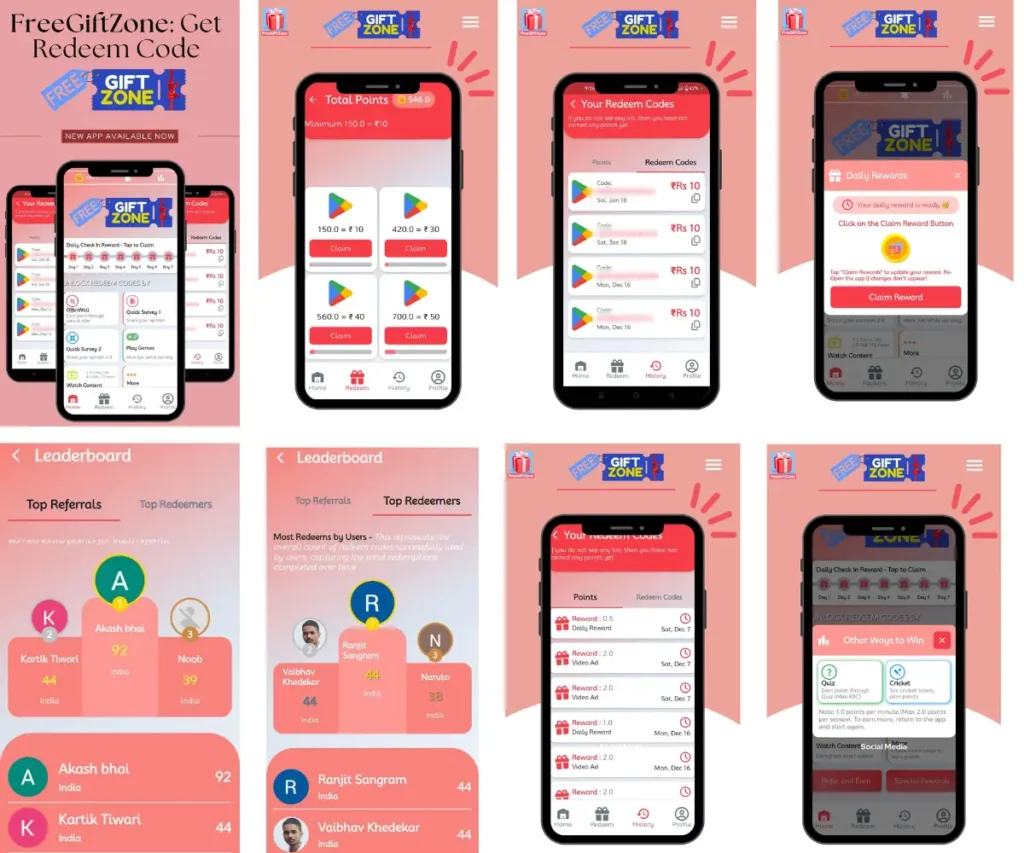
The account separates the earning side from the final gift-card redemption. Activities and coin balance remain inside FreeGiftZone, while the rewards area shows the brands that can be selected when they are available.
A real account screenshot is more useful here than a promotional card graphic because it shows what someone actually sees after signing in. The screenshot should show the reward interface or coin balance without exposing an unused voucher code or personal account information.
For the business information behind the platform, the About FreeGiftZone page explains who operates the website and how the service is presented.
The FreeGiftZone Check Before Working Towards PlayStation
I would not start collecting coins for one particular brand only because its guide appears in Google. The first thing worth checking is whether PlayStation is actually shown in the FreeGiftZone rewards area, because the article and the live reward catalogue do not have to change at the same time.
The next detail is the requirement shown with that reward. A number copied from an older screenshot can become wrong after the reward setup changes, so the requirement inside the account is the one that matters when you are deciding whether to continue.
There is one more check after the voucher reaches you. PlayStation voucher codes are tied to a country or region, and Sony says the voucher region must match the country or region of the PlayStation account that will redeem it. See PlayStation’s account-region instructions.
Disclaimer: FreeGiftZone is an independent rewards platform and is not affiliated with or endorsed by Sony Interactive Entertainment or PlayStation. PlayStation and related trademarks belong to their respective owners.
Reward availability depends on what appears inside the FreeGiftZone account when the rewards area is checked. This page explains the FreeGiftZone reward process and PlayStation gift-card use, but it does not guarantee that a PlayStation reward will be available during every visit.
What Can a PlayStation Store Gift Card Pay For?
A redeemed PlayStation Store gift card adds value that can be used for eligible digital purchases on PlayStation Store. PlayStation lists games, add-ons, PlayStation Plus memberships and virtual currency among the things that can be purchased with the balance.
The same card should not be treated like money for every Sony product. PlayStation says Store gift cards are for digital products, so physical consoles, accessories and PlayStation Gear cannot be purchased with that balance.
This distinction matters when someone receives a card expecting to buy hardware. The gift card may be perfectly valid while still being unusable for the physical product they had in mind. See the official PlayStation gift-card page for the current supported uses.
What the Wallet Balance Cannot Do
Once a gift card becomes PlayStation wallet funds, that balance stays inside the PlayStation system. Sony’s terms say wallet funds have no value outside PlayStation Store and cannot normally be transferred between accounts or refunded after they have been added, except where the law requires otherwise.
This matters before redeeming a code on a secondary account. A voucher that is added to the wrong PlayStation account cannot simply be moved to the account you intended to use later.
The same limit applies to physical PlayStation products. Sony says PlayStation Store gift cards are for digital Store purchases, while consoles, accessories and PlayStation Gear are outside that gift-card balance. Read the PlayStation terms before adding a large balance.
Where PlayStation Store Gift Cards Are Sold
PlayStation’s own gift-card page directs buyers to participating retailers rather than presenting every card as a direct PlayStation checkout. Online retailers can deliver a voucher code electronically, while physical retailers can also sell activated gift cards depending on the market.
For India, PlayStation’s official gift-card page currently shows ₹670 and ₹2,000 options through its retailer links. Those values can change later, so the live PlayStation page is a better place to check available denominations than keeping a permanent price list inside this guide.
Some physical gift cards also need activation at the register before they have value. PlayStation states that cards requiring this will say so on the card, which is useful to know if a newly purchased voucher refuses to work. Check the current retailer and activation information before buying.
How to Work Towards a PlayStation Reward on FreeGiftZone
When PlayStation is the reward you want, the useful starting point is your FreeGiftZone account rather than a long list of unrelated earning websites. Eligible activities can add coins to your balance, while the rewards area shows whether PlayStation is one of the options you can work towards.
Before spending several sessions collecting coins for PlayStation specifically, open the reward and look at the requirement shown there. Reward catalogues can change while an article stays published, so an old screenshot or remembered coin amount can give you the wrong expectation.
Once PlayStation is available and your balance reaches the requirement attached to that reward, continue through the redemption option shown inside the account. When it is absent, this page should remain a useful PlayStation guide rather than pretending that a card is waiting to be claimed.
How to Redeem a PlayStation Gift Card
PlayStation voucher codes contain 12 digits, and the code can be redeemed through PlayStation Store once you are signed in to the account that should receive the balance. On PS5, open PlayStation Store, use the menu and choose Redeem Code, then enter the voucher carefully.
The web process follows the same idea. Open PlayStation Store, select your profile and choose Redeem Code from the menu before entering the 12-digit voucher.
Once the code is accepted, the wallet credit or content becomes connected with that PlayStation account. PlayStation does not allow the redeemed balance or content to be moved freely between accounts, so check which account is signed in before confirming the code. See PlayStation’s voucher redemption instructions.

Check the Region Before You Redeem
A valid voucher can still fail when the country printed on the card does not match the country registered to the PlayStation account. PlayStation states that voucher codes and account country or region must match before the code can be activated successfully.
This becomes more important because PlayStation does not let you change the country or region of an account after it has been created. Buying a cheaper voucher from another country can therefore leave you with a genuine code that the intended account cannot use.
For a physical card, check the country or region printed on the voucher before redeeming it. The same check should be made before buying a digital code from a retailer outside your own market. PlayStation explains the rule in its country and region guidance.
A PlayStation Voucher Code Is Not the Same as a Discount Code
The two types of PlayStation codes can look similar when someone is entering them for the first time, but Sony treats them differently. A normal PlayStation Store voucher contains 12 digits and can add wallet balance or unlock the content attached to the voucher.
A PlayStation discount code uses 10 digits and is entered during checkout instead. Sony also says discount codes cannot be used for subscriptions or pre-orders, so putting a 10-digit discount code into the normal voucher field can leave you thinking that a valid code is broken.
Checking the number of digits is a simple first step when a code does not behave as expected. It can save you from repeatedly entering the right code in the wrong place. Read PlayStation’s code guidance for the type of code you have.
PlayStation Gift Cards Work Differently With Child Accounts
A PlayStation child account does not have its own separate wallet in the same way as the family manager account. Sony says wallet top-up vouchers need to be redeemed on the family manager’s account, and the family manager can then set a monthly spending limit for the child.
This can be confusing when a parent buys a PlayStation gift card for a younger player and then tries to redeem the wallet code directly on the child account. The voucher may be valid, but the account setup changes where that wallet value needs to go.
PlayStation Plus benefits on child accounts can also be affected by age ratings and parental controls. A family buying the card specifically for a child should therefore check the account setup before assuming that every purchase or subscription will become available immediately. Use PlayStation’s current account and voucher instructions when the account type is unclear.
What If the PlayStation Voucher Does Not Work?
A failed PlayStation voucher does not automatically mean that the code is fake. PlayStation first recommends checking that all 12 digits were entered correctly and that the voucher has not expired, because some codes have a specific validity period.
The next check is the country or region. A voucher issued for a different PlayStation account region cannot be fixed by entering the same code repeatedly, and wallet top-up vouchers also have restrictions on child accounts.
If the details look correct, check PlayStation Network status and sign out before signing back in. PlayStation also keeps redeemed vouchers in transaction history, which can help when a code reports that it has already been used. See the PlayStation error guidance for the message on screen.
What Happens When the Gift Card Does Not Cover the Full Purchase?
A wallet balance does not always need to match the complete price of the purchase. Sony’s terms allow an approved payment method to cover the remaining amount when the PlayStation wallet does not contain enough money for an eligible transaction.
That becomes useful when a gift card covers most of a game but leaves a small amount unpaid. The wallet balance is used as part of the purchase, while PlayStation can charge the remaining amount through an accepted payment method connected with the account.
Subscriptions need a little more care because PlayStation can also require a valid payment method for some subscription vouchers or recurring payments. The payment screen should be checked before confirming the purchase rather than assuming the gift card removes every other payment requirement. See the PlayStation terms for the rules that apply to wallet funds.
The PlayStation Store Sits Inside a Large Active Network
Sony reported 125 million monthly active PlayStation accounts in June 2026, up 2% from the previous June and a record for the month. Sony also reported 93.7 million cumulative PS5 units shipped by March 31, 2026. See the Sony investor presentation for the source.
Those numbers describe the PlayStation platform rather than the gift-card market. They are more useful here because a PlayStation Store gift card eventually becomes wallet value inside the same account ecosystem used for digital games, add-ons and network services.
Sony’s financial reporting also separates digital software, add-on content and network services as major parts of its Game & Network Services business. That is the environment in which PlayStation Store credit is actually spent, instead of an unrelated global gift-card-market forecast being used to make the article look data-heavy. Read Sony’s Form 20-F reporting for the broader business context.
Common PlayStation Gift Card Scams to Avoid
A PlayStation code should eventually lead back to PlayStation Store, not to a generator page that asks for account information before revealing a supposed reward. PlayStation has warned that sites offering free codes can be designed to collect personal information or push unwanted services.
Messages promising a free PlayStation code are another common problem. A copied PlayStation logo does not make an account official, and suspicious links should not be trusted simply because the page looks similar to PlayStation.com.
Keep an unused voucher private until you are ready to redeem it. Once someone else successfully applies the code to another account, the value cannot simply be moved back to the original owner. PlayStation’s scam guidance explains why these requests are dangerous.
Conclusion
A PlayStation Store gift card becomes useful once the voucher has been redeemed to the correct PlayStation account and the wallet balance is available for eligible digital purchases. The region check matters before that point because even a genuine voucher can fail when its country does not match the account.
The FreeGiftZone part happens earlier in the process. If PlayStation appears in the rewards area, the requirement shown with that reward tells you what is needed without this article making a permanent promise about availability.
After receiving a voucher, keep the code private and use PlayStation’s own redemption tools. If something goes wrong, the error message, account region and transaction history give you better places to start than trying the same code on another website.
About the Author