Apple gift cards can add value to an Apple account or be used for eligible Apple purchases, but the exact use depends on the type of card and the country where it was issued. This is worth checking before you redeem anything because an Apple Store Gift Card and a card that adds money to your Apple Account do not always work in the same way.
On FreeGiftZone, an Apple reward is handled through the user account rather than through a permanent list of public Apple codes. After signing in, eligible activities can add coins to your balance and the rewards area shows which gift cards are available at that time.
Apple may appear as a reward during one visit and be unavailable later. This guide can remain online while the reward list changes, so the FreeGiftZone account is the place to check present availability rather than assuming that an Apple card is waiting because this page exists.
Check Apple Gift Card Rewards in Your Account

Quick answer
FreeGiftZone does not promise an Apple gift card simply because this page is open. Sign in first and check the rewards available to your account. If Apple is listed, the account will show the requirement connected with that reward.
After receiving an eligible Apple gift card, use Apple’s own redemption process. The card type and country matter because Apple does not treat every gift card as the same product in every region.
How Apple Rewards Work on FreeGiftZone
The reward process starts after you sign in to FreeGiftZone. The account shows the activities available to you, while eligible activity can add coins to the balance connected with your profile.
The rewards area is the next place to check. If an Apple option is listed there, use the coin requirement shown with that reward instead of relying on an old number written into an article.
If Apple is missing, the page should still help you understand how Apple gift cards work, but it should not make you expect a card from the account at that moment.
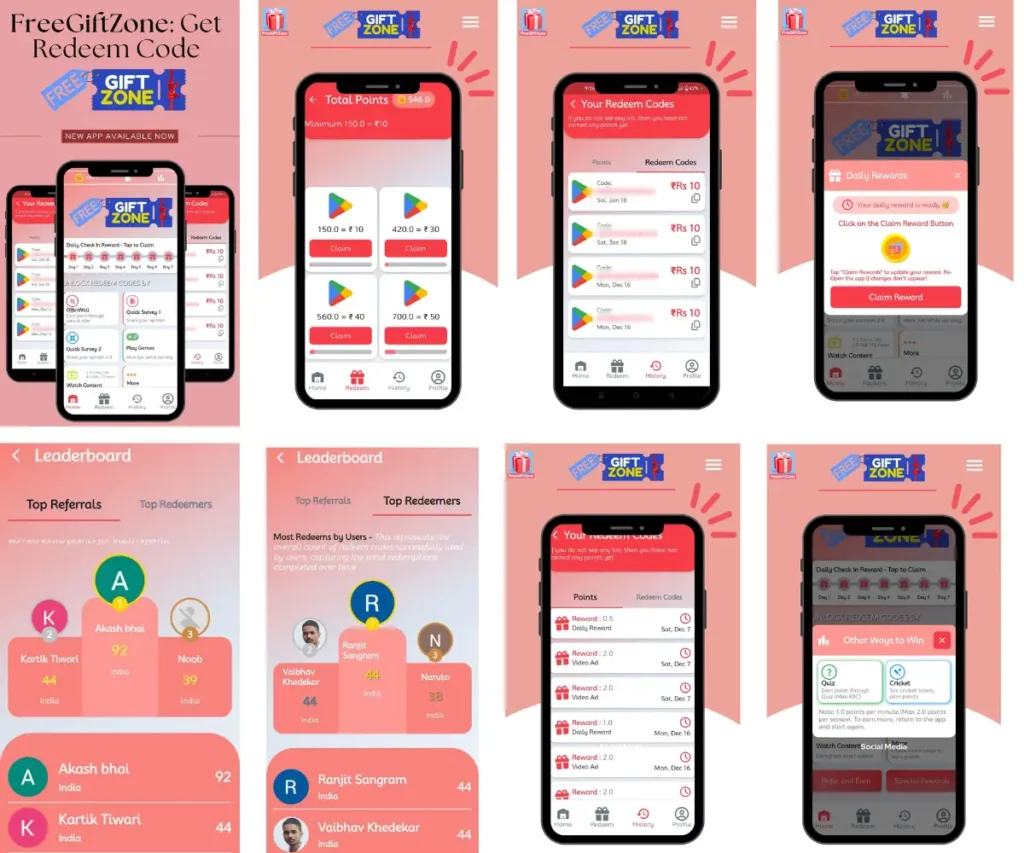
What the FreeGiftZone Account Shows
The screenshot above shows the real rewards area rather than a mock Apple code list. Your own account is still the current reference because the brands and requirements shown there can change after a screenshot is taken.
That is the useful separation on this page. The article explains how Apple gift cards work, while the account shows whether Apple is actually available as a reward at that moment.
FreeGiftZone is independent from Apple and is not endorsed by Apple. Apple names and trademarks belong to their respective owners.
What Can Apple Gift Card Balance Pay For?
What you can buy depends on the card type and the country connected with your Apple Account. For gift cards that redeem to Apple Account balance, Apple lists apps, games, in-app purchases and eligible subscriptions among the supported uses.
Apple also lists services such as Apple Music and iCloud+ as eligible uses for Apple Account balance. In countries where the unified Apple Gift Card is available, the balance can also be used for eligible Apple products and accessories.
Some purchases can still require a payment card to remain on file even when Apple Account balance is being used. This is one reason the checkout screen is more reliable than assuming every Apple purchase will behave in the same way.
Apple confirms these uses in its current support documentation.
Check Which Apple Gift Card You Have
| Card or balance type | What it is mainly used for | Important limitation |
|---|---|---|
| Apple Gift Card or Apple Account balance | Apps, games, in-app purchases, eligible subscriptions and supported Apple services | Country support and available uses depend on region |
| App Store Code | Apple Media Services such as App Store purchases, Apple Music and iCloud where supported | Not the same as an Apple Store Gift Card |
| Apple Store Gift Card in India | Eligible purchases at an Apple Store in India | Apple says it cannot be used for Apple Media Services or Apple Online Store purchases in India |
| Older App Store and iTunes cards | Adds eligible store credit to an Apple Account | Normally redeemed in the country or region where purchased |
The card name matters more than the Apple logo on the front. If an App Store redemption screen rejects the card, check whether it is actually an Apple Store Gift Card before trying another code field.
Apple’s support documentation explains the card-type and country restrictions.
If You Are Using an Apple Gift Card in India
India currently has more than one Apple gift card path, which is why the exact card name matters. Apple Store Gift Cards in India are for eligible purchases from an Apple Store in India, while App Store Codes are used for supported digital services such as apps, Apple Music and iCloud.
Trying to use the wrong card in the wrong place can produce an error even when the card itself is genuine, so check the printed card type before troubleshooting anything else.
Read the Apple Store Gift Card terms for India before using that type of card.
How Apple Account Balance Is Used in Real Life
If you already pay for an eligible Apple subscription such as iCloud+ or Apple Music, a redeemed Apple Account balance can be used towards eligible charges. The same balance can also cover eligible App Store purchases, games and in-app purchases.
This makes the balance useful even when you are not planning to buy a new Apple device. A user who already spends inside the Apple ecosystem can simply use the balance for purchases that would otherwise be charged to another supported payment method.
Where the unified Apple Gift Card is supported, the same Apple Account balance can also be used for eligible Apple products and accessories through supported Apple channels. That availability depends on the country, so the options shown in the Apple account and checkout flow are more reliable than assuming one global rule.
Apple and Amazon handle stored gift-card balance differently. If you use both services, the Free Amazon Gift Cards guide explains how Amazon balance behaves after a claim code is added to an account.
A Simple Example
Suppose Apple Account balance is already being used for an eligible iCloud+ subscription. After an eligible gift card is redeemed, the added balance can be used towards supported Apple charges instead of the gift card sitting unused as a code.
The useful part is not a dramatic success story. The card has completed its job once its value has moved into the correct Apple account and can be used for something the account holder already pays for.
How to Redeem an Apple Gift Card
For a gift card that adds funds to Apple Account balance, use Apple’s own redemption tools.
On an iPhone, open the App Store and tap your profile photo or sign in button. Choose Redeem Gift Card or Code, then scan the card with the camera or enter the code manually.
Apple currently says the redeemable code is normally 16 digits. If the card arrived by email, you can use the Redeem Now option in that message instead.
You can also redeem eligible cards through the Apple Account Card in Wallet on an iPhone. Once Apple accepts the code, the value is added to the Apple Account signed in at that time.
If the menus look different on your device, follow Apple’s current redemption instructions instead of an old screenshot.

What If the Apple Gift Card Does Not Work?
A failed redemption does not automatically mean the card is fake. The message shown by Apple usually points to the first thing worth checking.
| Message shown by Apple | What it usually means | What to check first |
|---|---|---|
| Card is not valid | Wrong card type or code entry problem | Confirm it is not an Apple Store Gift Card and recheck the code |
| Card has already been redeemed | The value may already be on the account | Sign out, sign in again, and check the Apple Account balance |
| Card has not been activated | Retailer activation is missing | Contact the retailer that sold the card |
| Code must be redeemed in another country or region | Card and account region do not match | Check the country where the card was purchased |
If the code still looks correct, check characters that can be confused when printed. Apple specifically lists pairs such as B and 8, O and 0, S and 5, and Z and 2 among the common mistakes.
Can You Turn an Apple Gift Card Into Cash?
Do not treat an Apple gift card as a normal way to move money into a bank or UPI account. Apple gift cards are intended for eligible Apple purchases, and the exact cash-redemption rules can depend on the card and local law.
Avoid sending an unused code to strangers or private resale groups in the hope of receiving cash later. Apple warns that once someone gets the redemption code, the value may be spent before the original owner can recover it. If you are unsure whether a request is legitimate, the gift card scam guide explains warning signs that apply across different brands.
Before You Redeem an Apple Gift Card
- Check the card name first. An Apple Store Gift Card and a card that adds money to Apple Account balance can follow different redemption rules.
- Check the country or region. Apple says gift cards generally cannot be redeemed outside the country or region where they were purchased.
- Keep the code private. Someone with an unused valid code may be able to spend the value before you do.
- Use the correct Apple Account. Once the value is redeemed, it belongs to the account that accepted it.
When an Apple Gift Card Request Should Make You Stop
Apple gift cards are meant for Apple products and services, not for paying a stranger, government office, support agent, or unexpected bill.
A common scam begins after someone creates urgency and then asks for the card number or redemption code. Apple warns that once the code is shared, the value may be spent before the original owner can recover it.
Do not send a photo of the back of the card or read the code over the phone because someone says they need to verify the balance. The code itself is the valuable part.
When the request arrives through an unexpected call, message, or email, stop and check the situation independently before doing anything with the card. Apple’s gift-card guidance explains that codes should be used for Apple purchases.
The Two Things Worth Checking First
Most Apple gift card problems become easier to understand once you check two things: the exact card type and the country connected with it.
After that, redemption itself is usually straightforward. Use Apple’s own redemption flow, confirm the Apple Account receiving the value, and keep the code private until the process is complete.
If Apple is the reward you want from FreeGiftZone, the live rewards area should still be checked before you collect specifically for it. The page explains the card, while the account tells you whether that reward is available now.
Frequently Asked Questions
Can you really get a free Apple gift card on FreeGiftZone?
An Apple reward should only be treated as available when it appears inside your FreeGiftZone rewards area with its current requirement. This article explains how Apple gift cards work, but the article itself is not evidence that an Apple reward is currently in stock.
Can I redeem an Apple gift card from another country?
Apple says gift cards generally cannot be redeemed outside the country or region where they were purchased. If Apple shows a country or region error, using the same code repeatedly will not remove that restriction. Apple Support.
What can I buy after redeeming an Apple gift card?
For cards that add value to Apple Account balance, Apple lists apps, games, in-app purchases, eligible subscriptions and iCloud+ among the supported uses. In markets where the unified Apple Gift Card is available, eligible Apple products and accessories can also be purchased through supported Apple channels. Apple Support.
What should I do if an Apple gift card says it has already been redeemed?
Apple recommends checking the Apple Account balance and signing out and back in to refresh it. If the balance is still missing, use Apple Support rather than sending the code to another website or person. Apple Support.