Check Google Play Reward Options in Your Account
How Google Play Gift Cards Work
A Google Play gift card gives you prepaid Google Play balance after the code is successfully redeemed to an eligible Google account. That balance can then be used for supported purchases available through Google Play in your country.
Gift cards can be physical cards or digital codes. The code is entered through Google Play and the value is added to the account selected during redemption. You should check the account carefully before confirming because Google Play balance cannot simply be moved between accounts later.
Google Play gift cards also have country and currency restrictions. A card generally needs to be redeemed and used in the country and currency where it was purchased, so a code from another region may fail even when the code itself is genuine.
Google confirms the physical and digital formats and states that cards are restricted by country and currency. See the Google Play Help guidance for the current rules.

| Type | How You Receive It | How It Works |
|---|---|---|
| Physical gift card | Purchased from an authorised retailer in a supported country | The code on the card is entered in Google Play and the value is added after successful redemption. |
| Digital gift code | Delivered digitally through an authorised seller, promotion, or supported gifting method | The code is entered in Google Play in the same way as a physical card code. |
Both types use a redemption code, but successful redemption still depends on factors such as the code being valid, the correct Google account being selected, and the country or currency requirements being satisfied.
If Google Play balance does not match what you need, you can also compare our Amazon gift card, Apple gift card, Xbox gift card, and PlayStation gift card guides. Each balance works inside a different store or ecosystem, so checking where it can actually be spent helps you choose the right reward before trying to earn one.
How to Earn a Google Play Gift Card Through FreeGiftZone
Google Play gift cards can appear among the redemption options available through FreeGiftZone when stock is available. If the reward is currently listed in your account, you can complete eligible activities, collect the required points, and request the reward according to the conditions shown there.
Google Play Gift Card
Availability: Check your account
Required points: Shown when the reward is available
Sign in to view current redemption options.
If Google Play is currently available as a redemption option, your account will show the points or other requirements needed before you can request it. Another reward may appear instead when Google Play stock is unavailable.
How the FreeGiftZone Reward Process Works
Step 1
Sign in and check which reward activities are currently available to your account. Depending on availability, these may include surveys, games, videos, or other supported activities.
Step 2
Complete eligible activities and track the points added to your account. Different activities can have different requirements and reward values.
Step 3
Open the redemption options after you have enough points. If a Google Play gift card is currently available and you meet its requirements, you can request it from there.
There is no fixed time for reaching a reward because activity availability and point values can differ between users. Check the points required for the current reward and the value shown for each available activity rather than relying on a promised number of days.
Why Reward Availability Changes
Reward availability can change when stock, campaign budgets, or the redemption options available through the platform change. This means a Google Play gift card may be visible at one time and unavailable later.
The current account reward section should be treated as the source for what you can actually request. The existence of this guide alone does not confirm current stock.
How FreeGiftZone Funds Rewards
FreeGiftZone earns revenue from advertising and reward activities available through the platform. Part of that revenue can be used to support gift card rewards and giveaways offered to users.
The exact source can differ between activities, which is why the reward conditions shown in your account matter more than a general promise on this page.
Other Ways Google Play Credit May Be Available

Google Play credit can come from more than one source, but the available method depends on your country and the service you use. Before completing tasks on any reward platform, check whether Google Play is actually listed in its current reward catalogue.
Google Opinion Rewards is one official Google example. On supported accounts, eligible survey rewards can be applied as Google Play credit through the payment profile connected to the app.
Other reward websites may also list Google Play gift cards from time to time, but their catalogues and country availability can change. Check the provider’s current redemption page rather than relying on an old list that says a Google Play reward is always available.
How to Use The Gift Cards
Redeem the code through Google Play rather than entering it on an unrelated website. Before confirming, check that you are signed in to the Google account where you want the balance to remain.
Google confirms that balance cannot simply be shared or transferred between Google accounts. See the Google Play Help guidance for the current balance rules.
On Your Android Phone
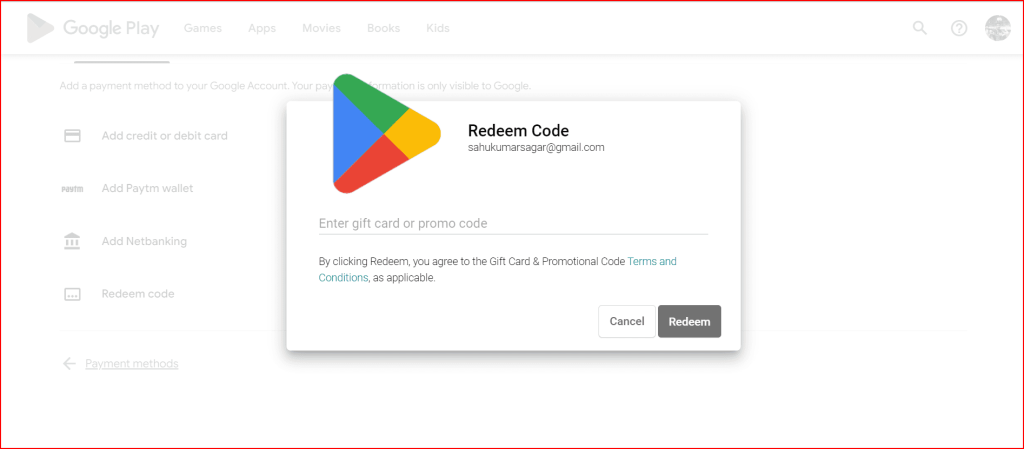
- Open the Google Play app.
- Tap your profile picture in the top right.
- Open Payments and subscriptions.
- Tap Redeem code.
- Enter your gift card or gift code.
- Tap Redeem.
- Check which Google account will receive the balance and confirm the redemption.
On a Computer
Use Google’s official Google Play redemption page while signed in to the account where you want the balance added. Enter the gift code there and review the account information before confirming.
If Google changes the location of the redemption control, follow the current instructions shown in Google Play Help rather than relying on an old menu path from this article.
Why a Valid Google Play Gift Card May Still Fail
A genuine Google Play gift card can still fail when the account and card belong to different countries or currencies. Google states that Play gift cards should be redeemed and used in the country and currency where they were purchased.
The country or region on your Google Play account also needs to match where the gift card or promotional code is offered. This means a code purchased for one country should not be advertised as a worldwide code simply because Google Play itself is available in many places.
If you receive a country related redemption error, check the card’s intended region and your Google Play account country before assuming that the code is fake. See Google’s country and currency guidance for the current rules.
Scams and Misleading Offers to Avoid
A website that claims software can generate unlimited Google Play codes should be treated with caution. A loading animation or partially hidden code does not prove that a real gift card exists.
Never send a Google Play gift card code to someone who asks for it as payment for a product, bill, refund, technical support problem, or emergency. Google warns that requests to use gift cards as payment outside their intended service can be a scam.
Be cautious when a free code suddenly requires a payment, Google account password, OTP, or unrelated app download before it can supposedly be released. Open Google Play yourself instead of entering a code or login information through a link sent by an unknown person.
A code that fails is not automatically fake. Country restrictions, account issues, previous redemption, activation problems, or an incorrectly entered character can also cause errors, so check the exact Google Play message before deciding what happened. Google’s support guidance describes several of these possible problems.
Before You Try to Earn a Google Play Gift Card
A Google Play gift card can be a useful reward when it matches the country of your account and is currently available through the reward method you are using. Check the reward requirements and stock before completing activities specifically for Google Play, because another redemption option may be available instead.
If you receive a code, redeem it through Google Play and confirm that you are using the correct account. When a code fails, read the error first because country restrictions, previous redemption, activation problems, or account conditions can matter just as much as whether the code itself is valid.
FreeGiftZone should show the current requirement when it offers a Google Play reward. This guide explains how the process works, but the reward section in your account is where you should check what is actually available at that time.
Frequently Asked Questions
Can I use a Google Play gift card on any Android phone?
The phone itself is not the main restriction. The important factors include the Google account receiving the balance and the country or currency for which the gift card was issued. Google states that Play gift cards should be redeemed and used in the country and currency where they were purchased.
What should I check if my Google Play gift card does not work?
Read the exact error shown by Google Play first. A code may fail because it was entered incorrectly, has already been redeemed, was not activated correctly, does not match your account country, or has another account related restriction. If you purchased the card and still have the receipt, Google also recommends contacting the retailer when activation may be the problem.
Why are Google Play gift cards not always available on FreeGiftZone?
Reward stock and redemption options can change. A Google Play gift card may appear when it is available through the current reward system and disappear when that stock or campaign is no longer available. Check your account reward section before completing activities specifically for Google Play.
Can I transfer Google Play balance to another Google account?
Google Play balance is generally tied to the account where it was redeemed and cannot simply be transferred between Google accounts. Check the account shown before confirming a gift card redemption.
Can I redeem a Google Play gift card from another country?
Google says Play gift cards may only be redeemed and used in the country and currency where they were purchased. Your Google Play account country also needs to match the country where the gift card or promotional code is offered.